




Too Long? Read This First ● YouTube ads for small businesses help you demonstrate products, explain services and encourage enquiries. ● You can start with a clear video filmed on your phone. Show the product early and give viewers one next step. ● Through AiSensy, you can create a Google Performance Max campaign, which can include YouTube alongside other Google channels. ● AiSensy campaigns start at ₹750 a day. Plan separately for service fees, applicable GST and video production. ● Track qualified enquiries, bookings and sales alongside views and clicks. ● If you run Google Ads from the AiSensy dashboard, you can get ₹20,000 in ad credits after spending ₹20,000, subject to the offer’s eligibility, deadlines and terms. |
A photo can show customers what your sofa looks like. But, a short video can show them how easily it turns into a bed. That’s where YouTube ads for small businesses become useful.
People already research purchases there: more than 200 million logged-in users in India made shopping-related searches on YouTube in July 2025.
Well, you don’t need a television-style commercial to join them. A clear demonstration filmed in your showroom can give customers a reason to explore your products.
In this blog by AiSensy, we’ll explain the types of YouTube ads, how to make a simple video, what to budget and how to launch a campaign through AiSensy.
What Are YouTube Ads?
YouTube ads are paid advertisements shown while people watch videos or browse YouTube. A furniture store, for example, could use a short sofa-bed demonstration to encourage viewers to explore its collection.
For a small business, video gives you space to answer questions that a product photo might leave open.
- Show how your product works. Demonstrate how the sofa opens, where bedding fits and how much space it needs.
- Reach people researching purchases. Give potential customers useful information while they explore products and compare options.
- Focus on the area you serve. Select relevant locations instead of advertising everywhere, then check where enquiries come from.
- Get enquiries on WhatsApp. Send viewers to a product page where they can ask about dimensions, colours or delivery.
The next question is how your video will appear. YouTube offers several advertising formats, each suited to a different viewing experience.
Types of YouTube Ads
| Ad format | How it appears | Example for a small business |
|---|---|---|
| Skippable in-stream | Plays before, during or after another video. Viewers can skip after five seconds. | Show the sofa opening immediately, then explain its features. |
| Non-skippable in-stream | Plays without a skip option. Available lengths depend on the campaign subtype. | Introduce a showroom opening with a short, focused message. |
| In-feed | Appears in places such as YouTube search results and recommendations. | Offer a useful demonstration of furniture for smaller homes. |
| Bumper | A non-skippable video lasting up to six seconds. | Remind viewers about a weekend showroom event. |
| Shorts | Appears between videos in the Shorts feed. | Show a quick vertical transformation from sofa to bed. |
These are YouTube’s main formats, rather than a list of options you can individually select in AiSensy. Non-skippable in-stream and bumper ads use other supported campaign types, rather than Performance Max. Google’s ad-format guide.
With AiSensy, your business can run Google Ads through Performance Max. PMax uses your goals, budget and creative across YouTube, Search, Display, Discover, Gmail and Maps.
Note: Google decides how much of the campaign budget goes towards YouTube. PMax does not reserve a fixed amount for that channel. How Performance Max works.
How to Make a YouTube Ad Without a Big Budget
Start with something your customers genuinely need to understand. A useful demonstration is easier to plan when you know the question it should answer.
1. Start With a Customer Question
Look at the questions your team answers every week. For the furniture store, that might be: “Can this sofa bed fit in a small living room?”
Build the video around the answer. Show the sofa’s dimensions, demonstrate the opening mechanism and leave enough room in the shot for viewers to understand its size.
You now have a clear subject without needing actors or a complicated script.
2. Show Your Product in the First Few Seconds
Open with the sofa turning into a bed. Put the product and its main benefit on screen before explaining the details.
An opening line could be: “Need a spare bed without giving up your living room?”
Keep your branding visible, but let viewers see what you are offering straight away.
3. Keep It Short
For a first demonstration, try a focused 20–30-second video. Treat this as a creative starting point, not a requirement for every format.
Give each part of the video a job:
- First five seconds: Introduce the customer’s need.
- Next ten seconds: Show the product working.
- Next five seconds: Explain a useful detail.
- Final few seconds: Give one next step.
For the sofa store, the final message could be: “Explore sizes and ask us about delivery.”
4. Make Horizontal and Vertical Versions
Film with both layouts in mind. Leave enough room around the product so cropping does not cut off the opening mechanism, measurements or text.
| Video version | Aspect ratio | Recommended HD size |
|---|---|---|
| Horizontal | 16:9 | 1920 × 1080 pixels |
| Vertical | 9:16 | 1080 × 1920 pixels |
| Square, when useful | 1:1 | 1080 × 1080 pixels |
These dimensions follow Google’s video asset guidance. Preview each version on a phone before using it. Google’s video specifications.
5. Add Captions and Clear Audio
Use readable captions so the main message makes sense without sound. Record speech away from traffic, showroom music and other background noise.
Before exporting, check that viewers can understand the offer, read the text and recognise the product. Use music and footage you have permission to include in advertising.
Here are a few ideas beyond furniture:
| Business | What to show | Next step |
|---|---|---|
| Furniture store | A sofa bed opening, its dimensions and fabric options. | Ask about availability and delivery. |
| Coaching centre | A teacher explaining one problem, followed by the batch schedule. | Request course details or a counselling session. |
| Bakery | A cake being decorated, with its size and ordering notice period. | Share an event date and request a quote. |
| Home-cleaning service | The areas covered during a kitchen deep clean. | Share the location and property size. |
| Clothing store | How an outfit fits and moves, with close-ups of the fabric. | Explore sizes and colours. |
How Much Do YouTube Ads Cost?
There is no single price for YouTube advertising. Your campaign, audience, competition and bidding approach affect what you spend.
Through AiSensy, the minimum average daily budget for a Google Performance Max campaign is ₹750. This is AiSensy’s campaign minimum, not a universal minimum for YouTube ads.
With an unchanged budget throughout the month: ₹750 × 30.4 = up to ₹22,800 in monthly ad spend.
For most campaigns, Google can spend up to twice the average daily budget on a busy day, while applying its monthly spending limit. Google’s budget guidance.
| Cost to plan for | What it covers |
|---|---|
| Advertising spend | The budget used to show your ads. |
| Service fee | AiSensy’s stated 10% fee on ad spend. Check the charge displayed in your account. |
| Applicable GST | Taxes added to the relevant charges. |
| Video production | Filming, editing, captions or any outside help you hire. |
For a fuller budget calculation, read our guide to Google Ads cost in India.
Start with one product and the area you can serve reliably. That makes it easier to understand which enquiries are useful before expanding.
How to Run YouTube Ads With AiSensy
You’ll create a Performance Max campaign inside AiSensy. Our Google Ads launch guide explains the wider setup and dashboard features.
Before You Start
Have these four things ready:
- An active WhatsApp Business API account on AiSensy.
- A relevant website page and access to install the website code.
- Advertising credit in your Ads Wallet.
- Your campaign material: video links, logo, product images, ad copy and serviceable locations.
Step 1: Open Google Ads Setup
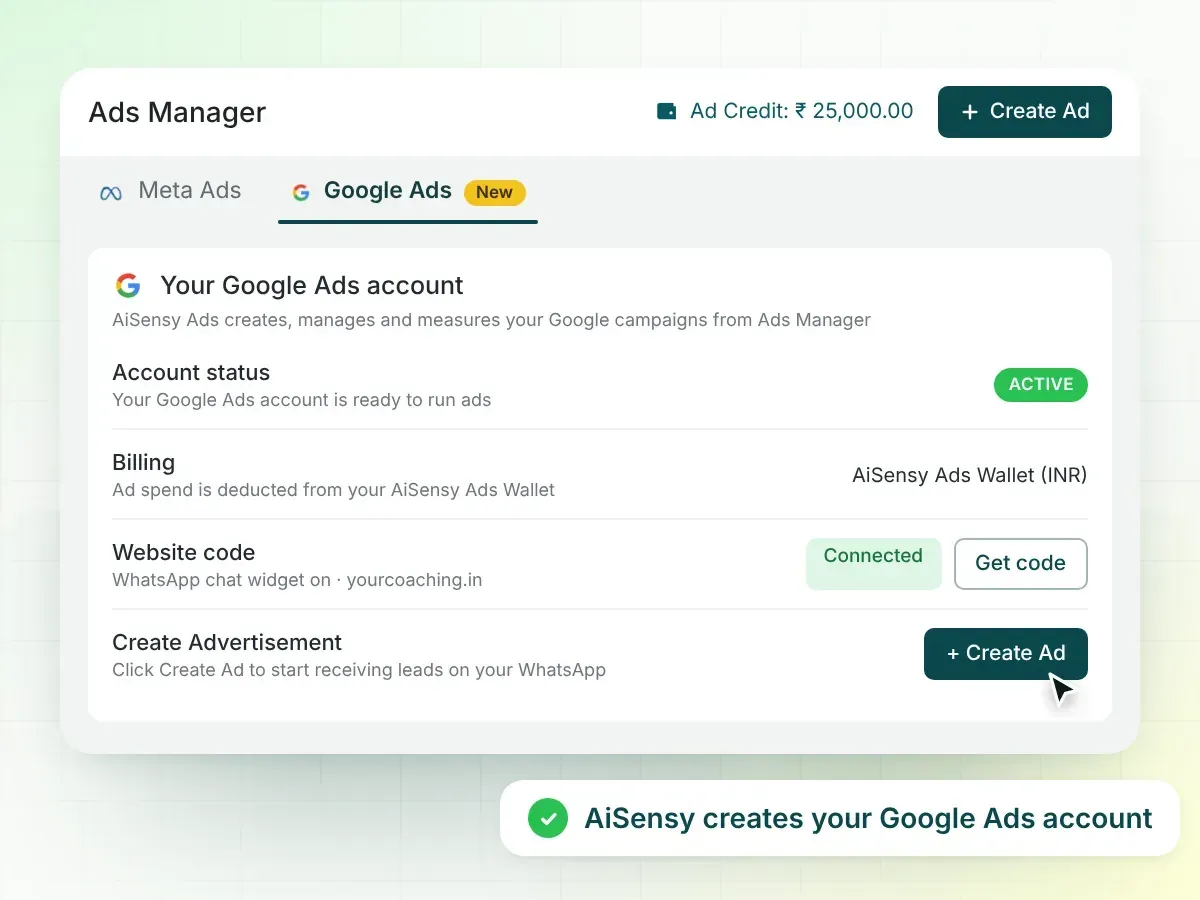
Go to Ads Manager → Setup → Google Ads. Complete the onboarding and check for ACTIVE account status.
Review your Ads Wallet balance and add credit before launching. Your business chooses the campaign settings; AiSensy’s team can help with setup on a call.
Step 2: Connect Your Website
Select Get code, follow the installation instructions and enable the WhatsApp widget. Use Check connection to verify your destination page.
Then test it yourself. Open the sofa-bed page on your phone and tap the widget. Confirm that the conversation reaches the correct business number.
If the connection fails, check the installation and widget before continuing.
Step 3: Choose Your Campaign Goal
Select Create Ad → Google Ads.
Review Get messages and add another relevant goal, such as Book an appointment or Drive purchases, when the corresponding tracking is configured.
For the furniture store, promote the sofa-bed collection and enter that page’s URL. Visitors should find the same products they saw in the video.

Step 4: Choose Your Locations and Language
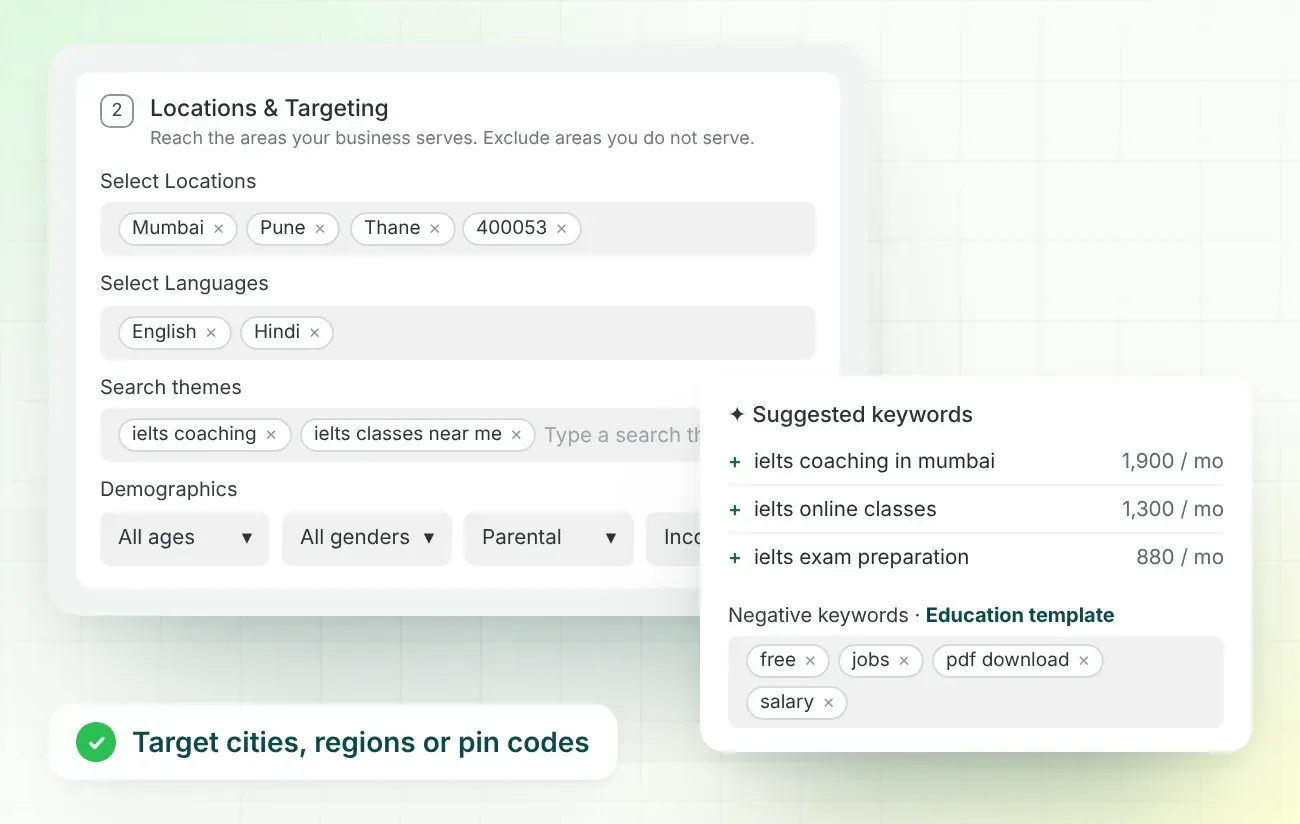
Select the locations you serve and the languages your customers understand.
If you deliver only within Pune, start there. Make sure the video, destination page and team answering enquiries can explain the offer clearly to that audience.
Our guide to Google Ads for local businesses explores location-focused campaigns in more detail.
Step 5: Set Your Budget and Schedule
Enter the daily budget and choose your start date. Add an end date for a time-limited offer.
Review the displayed fees and budget recommendation before continuing. The recommended amount may differ from the minimum.
If your ad promotes a weekend event, check that the campaign schedule and website display the correct dates.
Step 6: Add Your Videos and Ad Content
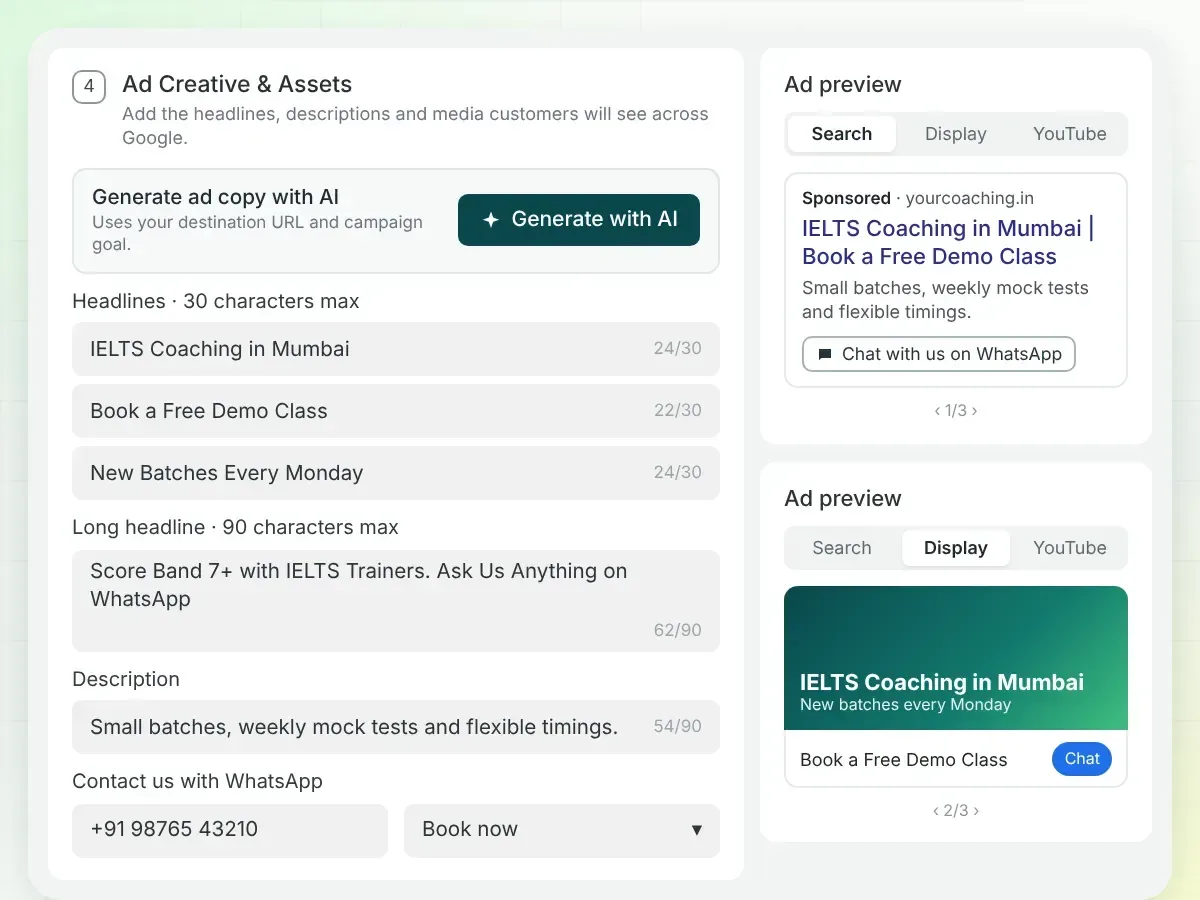
Open Ad Creative & Assets. Add your YouTube video links, logo, marketing images, headlines and descriptions.
AiSensy’s setup supports up to five YouTube video links, with videos at least ten seconds long. The form also asks for:
- At least three headlines, up to 30 characters each.
- One long headline, up to 90 characters.
- At least two descriptions, up to 90 characters each.
A furniture headline could be “Sofa Beds for Smaller Homes.”
Review any AI suggestions against the actual product. Check prices, delivery areas and features before using them.
Step 7: Add WhatsApp Details and Publish
Under Contact us with WhatsApp, review your number, call to action and starter message.
For example: “Hi, I saw your sofa-bed ad. Can you share the dimensions and delivery options?”
Customers can contact you through the website widget. Eligible ads may also show a direct WhatsApp option, depending on Google’s serving decisions. Do not expect that option on every YouTube placement.
Check the settings and select Draft & Publish. Google reviews the campaign before it can run.
Step 8: Manage Enquiries on WhatsApp
When someone asks whether the sofa fits their room, start with the measurements. Check their delivery location and share the relevant product details.
A shared WhatsApp inbox helps your team handle these conversations through one business number.
Record whether the person needs more information, wants a quote or has placed an order. That makes the next section much easier.

How to Measure Your YouTube Ad Results
Views show that people watched your video. Your business also needs to know whether those viewers became useful enquiries or customers.
Consider this illustrative ₹15,000 campaign, rather than a promised result:
| Metric | Example |
|---|---|
| Ad spend | ₹15,000 |
| Enquiries attributed to the campaign | 50 |
| Qualified enquiries | 20 |
| Confirmed orders | 5 |
| Cost per enquiry | ₹15,000 ÷ 50 = ₹300 |
| Cost per qualified enquiry | ₹15,000 ÷ 20 = ₹750 |
| Advertising cost per order | ₹15,000 ÷ 5 = ₹3,000 |
A qualified enquiry might be someone within your delivery area who wants the advertised sofa and is considering a purchase.
Whether ₹3,000 per order is affordable depends on what you earn after product, delivery and other costs. Include service fees and production expenses when assessing the overall return.
Note: These figures cover the whole Performance Max campaign. Only describe results as YouTube-specific when your channel reporting supports that conclusion.
In Ads Manager → Google Ads, review spending, conversations and qualified leads. Open campaign analytics for more detail and keep lead stages accurate as customers progress.
Our Google Ads conversion tracking guide explains how to connect actions with reporting. A click on a purchase button should not be recorded as a completed sale.
Conclusion
A useful YouTube ad starts with something your customer wants to understand. Show how the product works, explain the details and make the next step easy.
With AiSensy’s Google Ads dashboard, you can create a Performance Max campaign, manage its budget and handle incoming WhatsApp enquiries from the same platform.
Start with one offer, one clear video and a result you can measure. Then use the questions and orders you receive to decide what to improve.
FAQs About YouTube Ads for Small Businesses
Can a small business advertise on YouTube?
Yes. A small business can advertise through Google Ads using a suitable campaign type. AiSensy offers a Performance Max setup that can include YouTube alongside other Google channels.
Do I need professional equipment to make a YouTube ad?
No. A phone, steady framing, clear lighting and understandable audio can be enough for a first demonstration. Check that the product and captions remain easy to see on a small screen.
Can I reuse an Instagram Reel as a YouTube ad?
You can adapt your own vertical footage if you have the rights to use its video and audio in advertising. Remove platform watermarks and check the offer, captions and destination before using it.
What is the minimum budget through AiSensy?
AiSensy’s stated minimum is ₹750 a day for its Google Performance Max campaigns. Service fees and applicable taxes are separate. Review the charges in your account before publishing.
Do I need a website for the AiSensy setup?
Yes. You need a destination page with the required website code and WhatsApp widget. Test the page and connection before submitting the campaign.
How long should my first video be?
A focused 20–30-second demonstration is a practical starting point. Show the product early and give viewers one next step. The video you add must also meet the campaign’s asset requirements.
Should I judge the campaign by video views?
Use views to understand attention, then look at qualified enquiries, bookings and confirmed purchases. These results tell you more about whether the advertising supports your business.